Meeting transcription that lives on your Mac, not someone else's server.
OpenOats records both sides of any call and writes the transcript to a Markdown file in a folder you own. The app runs silently in your menu bar. Nobody on the other end sees a bot, a banner, or a notification. When the call ends, the file is there. Your AI tools read it the same way they read everything else on your machine.
What changes
Nobody on the call knows you're recording
OpenOats captures your mic and system audio together. One transcript, both sides of the conversation. The app window is hidden from screen share by default. There's no bot joining the meeting, no calendar integration to set up, no banner appearing for the other participants. It sits in your menu bar and stays invisible.
Your transcripts are Markdown files in a folder
Every recording becomes a .md file on your Mac. Claude can read it. Cursor can search it. A grep command can find every time someone said "pricing" across six months of calls. You don't authenticate with anyone, you don't pay for API access, and you're never going to hit a rate limit reading files off your own disk. If you stop using OpenOats tomorrow, your transcripts are still right there.
What it feels like
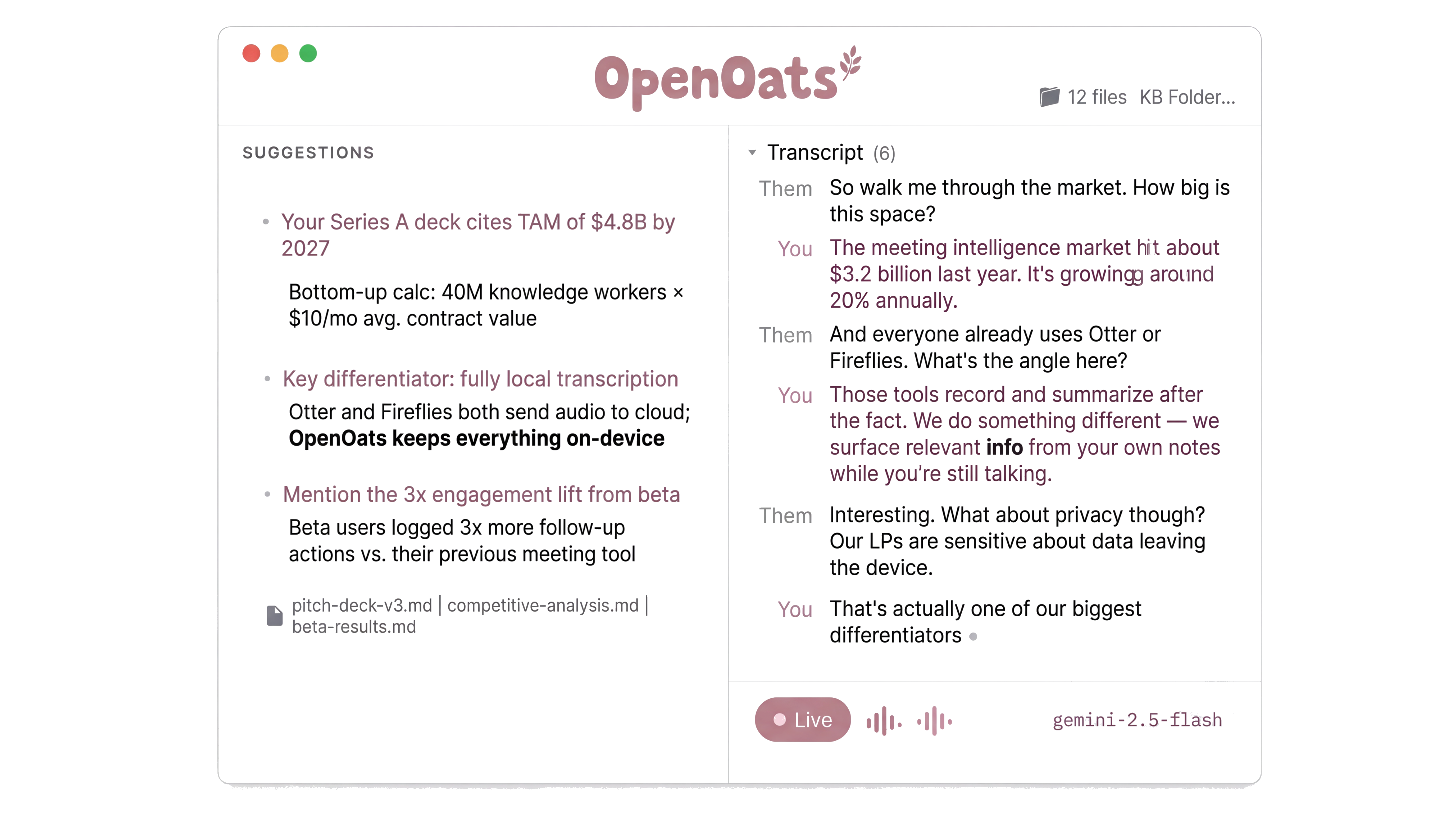
It pulls in what you need while you're talking
Point OpenOats at a folder of notes, research docs, or customer briefs. As the conversation moves, it searches that folder and surfaces what's relevant. The preparation you already did shows up exactly when it matters, without you stopping to look anything up.
It knows when you're in a meeting
OpenOats detects when you open Zoom, Teams, or Slack and prompts you to start recording. You stop having to remember. The standup that turned into a planning session. The "quick sync" where someone made a commitment. The client call where a number came up and you can't remember what it was. All captured.
Why it works this way
Transcription runs on your Mac, not a server somewhere
The speech engine runs on Apple Silicon. Audio never leaves your machine. This is not a privacy policy promising they won't peek at your data. There is no server. There is nowhere for the audio to go. That's also why it works offline, on a plane, or in a building where the WiFi drops every ten minutes. OpenOats ships with engines covering 30 languages. They're modular. When a better model comes out, you swap it in.
Common questions
"How does it compare to Granola?"
Granola is polished and well-built. It stores your data in their cloud and gives you access through their interface. OpenOats stores your data as files on your machine. The difference shows up when you try to do something the tool's designers didn't plan for. With files, you can grep them, feed them to an agent, back them up however you want, or build something on top. There's nothing between you and your transcripts.
"Is local transcription actually good?"
OpenOats ships with multiple engines. Qwen3 handles 30 languages with automatic detection, including Chinese, Japanese, Korean, and Arabic. Parakeet TDT v3 covers 25 European languages. Both run on your Mac's GPU. The engines are modular, so when the community builds support for something better, you switch.
"Do I need to be technical to use it?"
Download the app. Grant microphone access. Press record. That's the whole setup. If you want to go further later, swap transcription engines, change the output format, wire up automations - everything is open and documented. But the default experience works without configuration.
"Is it legal to record without telling people?"
Depends on where you are. Most US states and many countries allow one-party consent, meaning you can record a conversation you're participating in. Some places require all parties to agree. Check your local laws. OpenOats gives you the capability. How you use it is your decision.
"What hardware do I need?"
Any Mac with Apple Silicon (M1 or later). Faster chips give faster transcription, but an M1 MacBook Air handles it without problems.
Under the hood
- Transcription engines
- Qwen3, Parakeet TDT v3, Whisper. All run as CoreML models on-device. Swappable in settings.
- AI integration
- OpenRouter for cloud models (Claude, GPT, Gemini). Ollama for fully local inference. Any OpenAI-compatible endpoint.
- Knowledge base
- Vector search with reranking and quality gating. Surfaces relevant notes mid-call on a 90-second cooldown.
- Output format
- Plain Markdown transcripts plus structured session logs. AI-generated meeting notes optional. Files land in
~/Documents/OpenOats/. - Stack
- Swift 6.2, macOS 15+. MIT licensed. 1,180+ stars, 111 forks. Contributions welcome.
Why this exists
Cloud transcription tools charge you for the privilege of restricted access to your own conversations. Want your AI agent to search last month's meetings? Hope the vendor's API supports that query. Want to feed transcripts to a different tool? Export, download, re-import.
OpenOats puts Markdown files in a folder. That's the entire architecture.
It sounds too simple to be a product, which is exactly why incumbents can't copy it without dismantling their own business model. Their revenue depends on sitting between you and your data. OpenOats has no revenue model to protect.
APIs have rate limits. Your filesystem does not.